Tactic 33 of 101 · AI Plays
How to Show Clients Their Finished Space With AI
Every proposal in your industry looks the same: line items, totals, a logo. Put a picture of the client's own room with the finished work already in it on the cover, and you're not selling a scope anymore. You're selling the after. Basic AI automation makes this a few minutes per proposal.
By Justin Novak · Updated November 4, 2026
- Ideal for
- Service Business, Small Business
- Difficulty
- Easy
- Capital required
- None
- Time to execute
- Quick win (0 to 3 days)
- Scalability
- Medium
- Risk / reward
- High
Why it works
People don't buy scopes of work. They buy the after. A homeowner staring at a line-item estimate is doing math. The same homeowner staring at their own fireplace wearing the exact tile they picked is imagining living there, and that's what signs.
Showing the finished result used to mean a rendering service and a week of back and forth. Now it's a photo, the supplier's product page, and an AI pass.
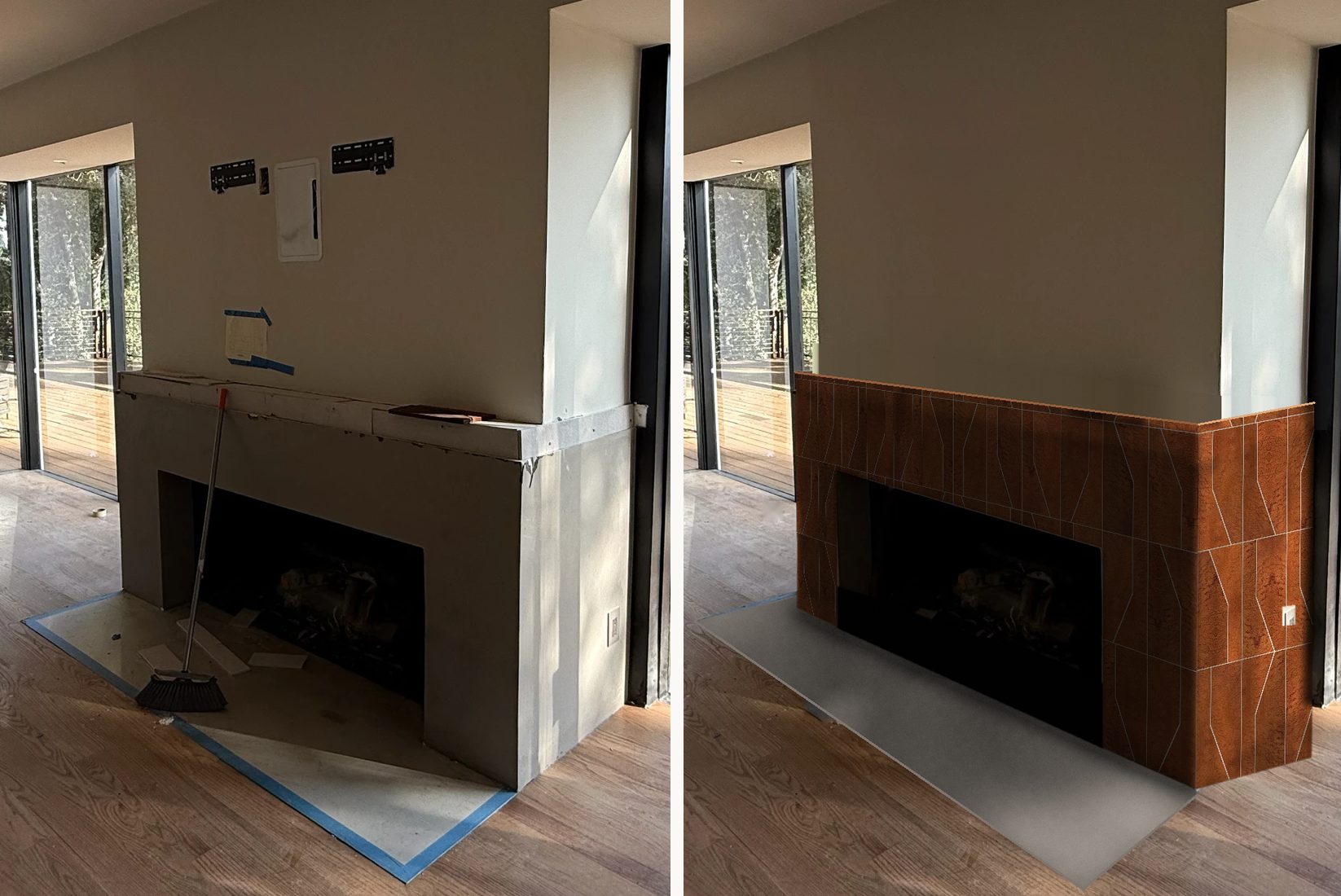
How to run it
- Get one honest photo of the space. Straight on, decent light. The job-site mess is fine. You're about to remove it.
- Pull the real product, at real scale. The supplier's site has the product image and the true dimensions. Use them. This works because it's their actual tile at its actual size, not a vibe.
- Place it in perspective. AI maps the product onto the surfaces in the photo at the right scale and angle. Automated placement, not freehand painting, which is why the geometry holds up.
- Run the finished-room pass. Remove everything that says construction: tape, debris, protection board, the old TV mounts. They should see their room on move-in day.
- Keep it honest. Label it a concept. Have the AI say what it estimated and what it invented. Your credibility is what this play spends, so protect it.
Real world example
A remodeling client of ours sends branded proposals generated from plain QuickBooks estimates. For a fireplace job, we put a render of the client's own living room, finished in the handmade Zia tile they'd picked, on the proposal cover. The before photo had a broom and bare drywall in it. The after was the same camera angle with the finished surround.
Same price. Same scope. Completely different feeling when they open the PDF. The proposal stopped being a quote and became the first picture of their new room.
Common questions
Do I need design software or a 3D artist?
No. A photo of the space, the real product's image and dimensions from the supplier's site, and an AI pass to place it in perspective and clean up the room. It's prompt and verify, not modeling.
What if the render over-promises?
Be honest by policy. Label it a concept render, keep the real product and true dimensions, and have the AI state what it estimated versus what it invented. The goal is to help them see it, not to fake a photograph.
Where does the render go?
The proposal cover, first. Then the before-and-after page, the follow-up email, and eventually the portfolio post when the real job finishes.
Related plays
How to Use AI to Analyze Your Sales Pipeline
Connect your CRM to Claude through an MCP server and ask your pipeline questions in plain English. What should I chase this week? costs less than pennies.
How to Turn One Project Into 30 Social Posts
Every finished job becomes three posts fanned across ten platforms: around 30 placements from one project. AI writes from verified facts; you approve once.
How to Turn One Webinar Into 30 Days of Content
One recording becomes clips, articles, a newsletter, and follow-up emails: 32 pieces and 118 placements a week, every quote verified against the transcript.
The playbook keeps growing
Get new plays as they ship.
The playbook is growing to 101+ tactics. One email when new plays drop. No pitch, just plays.
You’re in. New plays will find you.