Tactic 32 of 101 · AI Plays
How to Use AI to Analyze Your Sales Pipeline
Your CRM already knows which deals are stalling, which proposals expire Friday, and what your quarter really looks like. Getting answers out of it used to mean building reports. Connect it to AI through an MCP server and you just ask, in plain English, for less than pennies per question.
By Justin Novak · Updated November 4, 2026
- Ideal for
- B2B, Service Business, Small Business
- Difficulty
- Medium
- Capital required
- None
- Time to execute
- Quick win (0 to 3 days)
- Scalability
- Medium
- Risk / reward
- High
Why it works
Every CRM is a graveyard of reports nobody opens. The data is good. The interface is the problem. A question like "which deals should worry me?" takes four filters and a saved view, so nobody asks it on a Tuesday afternoon.
Plain English removes the toll. When asking costs less than pennies and takes five seconds, your team actually asks. That's the whole unlock.
How to run it
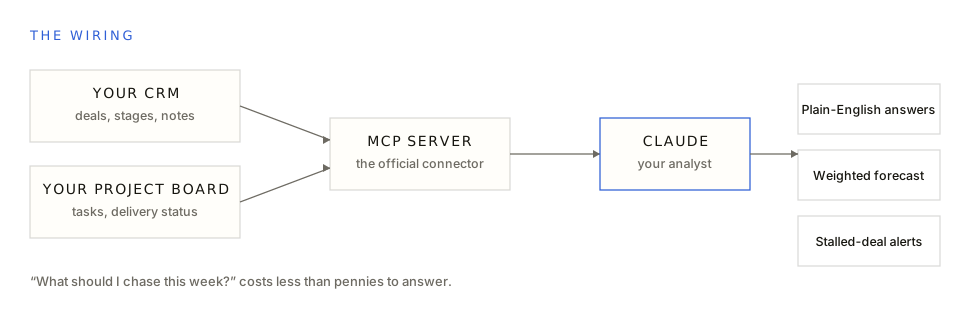
- Connect the official MCP server for your CRM. We use GoHighLevel's with Claude. Most major CRMs ship one now. Read-only keys first.
- Wire in the other half of the truth. Sales lives in the CRM. Delivery lives in the project board. Connect both and the analyst can answer questions that span them, like which won deals haven't kicked off yet.
- Snapshot on a schedule. A pipeline photo every few hours turns "what does it look like?" into "what changed?", and what changed is the question that actually matters. Stalled deals, expiring proposals, and forecast drift all fall out of comparing snapshots.
- Put a question box in front of the team. The win isn't you running one clever query. It's every rep asking "what should I chase this week?" scoped to their own book, instead of waiting on a report that shows up Thursday.
- Let the forecast check itself. Compare what the weighting predicted against what actually closed, and it gets more honest every month. No dashboard sprint, no BI hire. One connector, one analyst, questions in English.
We run this exact setup for a client with long, high-ticket sales cycles: a weighted forecast, an at-risk radar for stalled deals and expiring proposals, and a plain-English question box the whole team uses instead of reports. Our favorite question is also the simplest one: "what needs doing today?" That's the point. When the bar for asking drops to zero, the pipeline actually gets looked at every day.
Common questions
What is an MCP server, in one sentence?
A standard connector that lets an AI assistant read and act on another system, so Claude can query your CRM directly instead of you exporting spreadsheets into a chat window.
Is it safe to point AI at my CRM?
Scope it. Start read-only, keep write permissions off until you trust the answers, and treat anything the model writes back as a draft a human approves. The analyst answers questions. It doesn't move your deals.
What questions are actually worth asking it?
What should I chase this week. Which deals have gone quiet for 14 days. Which proposals expire soon. What's my weighted forecast against last quarter. The questions you already have and never pull the report for.
Related plays
How to Turn One Webinar Into 30 Days of Content
One recording becomes clips, articles, a newsletter, and follow-up emails: 32 pieces and 118 placements a week, every quote verified against the transcript.
How to Show Clients Their Finished Space With AI
Put an AI render of the prospect's actual room, finished, on the cover of the proposal. They stop evaluating a quote and start seeing their own result.
How to Use AI to Improve Your Email Marketing
Feed AI your entire email campaign history and let it find the patterns that actually convert. We mined 123 campaigns; three rules tripled output.
The playbook keeps growing
Get new plays as they ship.
The playbook is growing to 101+ tactics. One email when new plays drop. No pitch, just plays.
You’re in. New plays will find you.